Copy the Share link, including its unlisted token
- Open the video's Share option and copy the accessible public or unlisted link.
- Keep any unlisted path token or h parameter intact. A bare numeric ID may not be enough for an unlisted video.
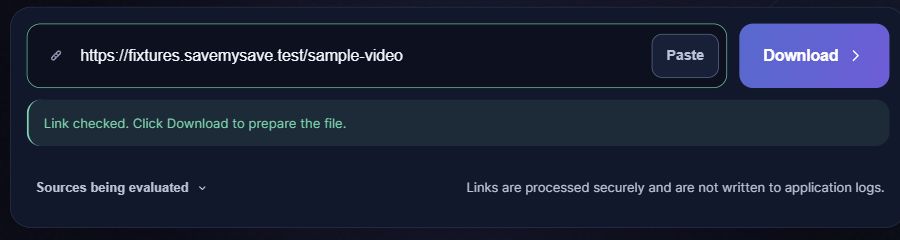
- Paste the link; checking starts automatically. Choose an available format, then click Download. A private or password-restricted video is not bypassed.
Supported link shapes
URL patterns, not playable test videos. Replace the placeholders with your own identifiers.
https://vimeo.com/VIDEO_IDhttps://vimeo.com/VIDEO_ID/UNLISTED_TOKENhttps://player.vimeo.com/video/VIDEO_ID?h=UNLISTED_TOKEN
Management links are not Share links
A /manage/videos/ address belongs to account management. SaveMySave does not use Vimeo accounts or cookies. The video must be accessible through the provided Share link; deleting its unlisted token can remove the information needed for access.
Where to get the video link
Use the video’s Share link rather than /manage/videos/. If the video is unlisted, preserve the token in the path or the h parameter. Do not publish a private share token in a screenshot or support message.
Supported video links
- Accessible public Vimeo video links
- Accessible unlisted Share links with the required token
- Supported player.vimeo.com video addresses
Not supported in this workflow
- Account-management addresses
- Password-protected and private videos
- Guaranteed original master-file delivery
What happens after you paste a link
If the link does not work
- A bare video ID can lose the access information for an unlisted video. Copy its full Share link again.
- A generic failure does not prove that the video is private. Read the displayed error and distinguish a source failure from an access restriction.
Save the file on your phone or computer
Choose a quality if a choice is offered, then select Save video. When the file is ready, your browser will attempt to start the download automatically. If it does not start, select Download file. Check your browser’s downloads list for progress. On iPhone, a Safari download is usually found in Files rather than automatically added to Photos. On Android, check Downloads or your file manager. Your browser settings can change the destination.
Questions about Vimeo
Why does /manage/videos/ fail?
That address is not the public viewing link. Copy the video's accessible Share link instead; signing in inside your browser does not sign this service in.
Can an unlisted video work?
An accessible unlisted Share link can work when its required token is included. This is not a way to discover or unlock private videos.
Will I get the original uploaded master?
No original-master guarantee is made. The available stream and resolution depend on the source and current adapter output.
What if access changes after checking?
The source may stop exposing that stream. Recheck the Share link; the initial metadata check is not a guarantee that a later transfer will complete.